MXR M305 Tremolo

MXR M305 Tremolo

€194,00
Sale price  €194,00 Regular price 
Skip to product information
MXR M305 Tremolo

MXR M305 Tremolo

Cod:

04508698
€194,00
Sale price  €194,00 Regular price 

Spedizione gratuita

Questo prodotto non è presente fisicamente nel punto vendita, ma verrà preparato e spedito dai nostri magazzini esterni in 24/72 ore dall'ordine. Potrai scegliere la consegna a domicilio, o presso un punto di ritiro o anche ritirato direttamente in negozio
Disponibile solo online e spedito o ritirato in negozio in 24/72h dall'ordine 

Ultimi pezzi

Ask an expert

We are musicians and are at your disposal, contact us!
info@yourmusiconline.it

Description

The M305 Tremolo by MXR is the guitar effect pedal that marks the return of Tremolo within MXR's acclaimed line. The M305 combines a complete range of classic Tremolo sounds, optimized and integrated with features that can satisfy even the most demanding modern musician.

OVERVIEW OF THE MXR M305 TREMOLO

With six available waveform shapes, both classic tremolo sounds and new sounds designed by the MXR design team are well represented. The MXR style recreates the organic sound and pulse of the beloved MXR M159 stereo Tremolo. The Bias style captures the rich, powerful compression of the early '60s tube amp tremolo effects. Revo, an original style, transforms the optical tremolo waveform by inverting it, for a very wide tonal excursion. The Opto style emulates the pulsating tremolo generated by photocells in many popular amplifiers. Inspired by an iconic outboard effect, the SQR setting produces a choppy, super-pronounced tremolo. Finally, the Harmony style recreates the trippy, phaser-like tremolo produced by some rare vintage amplifiers.

Getting a ready-to-use sound from the M305 Tremolo is simple thanks to the Speed, Gain, and Depth controls, which respectively manage the speed, volume, and intensity of the selected effect. To scroll through the six Tremolo styles, simply press the Gain knob. For those who love to experiment, several additional functions are available, from stereo operation to tap tempo control, from the possibility of using an expression pedal to the Envelope effect that makes the effect's response sensitive to your attack.

POWER

The MXR M305 Tremolo can be powered by Jim Dunlop's 9-volt ECB003 adapter, the DC Brick, the Iso-Brick, and the Mini Iso-Brick. It cannot be battery-powered.

CONTROLS

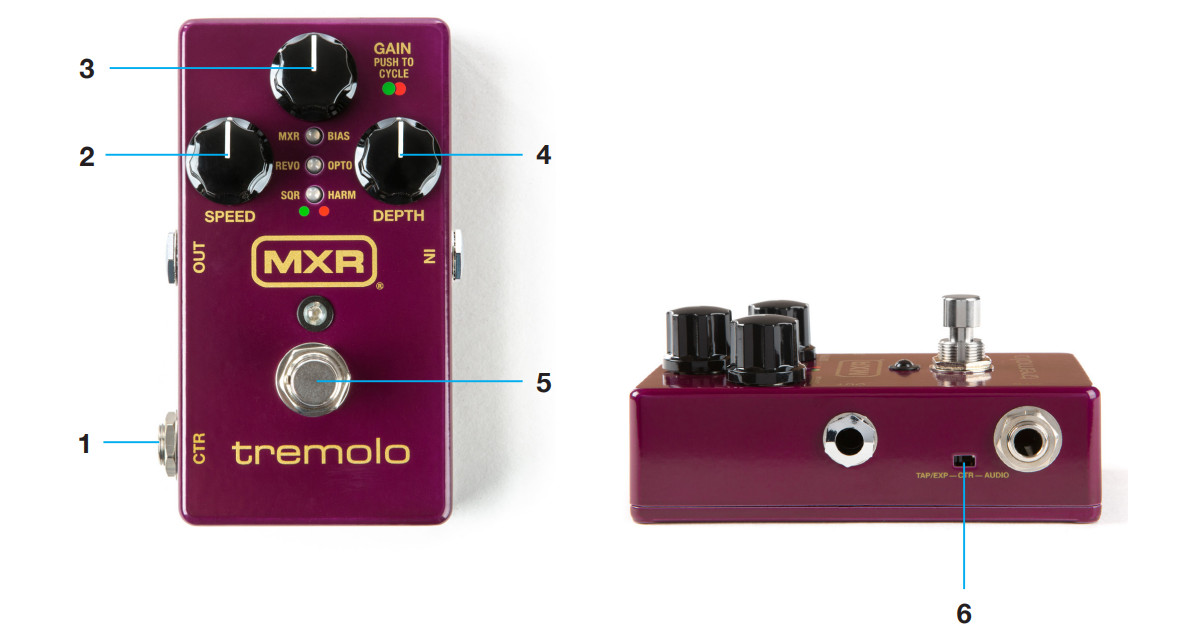
Ctr Out: Allows the use of tap tempo, an expression pedal, or can act as a stereo output;
Speed: Adjusts the effect speed;
Gain: Sets the output level and selects the tremolo style (indicated by flashing red or green LEDs);
Depth: Adjusts the effect intensity;
Footswitch: Activates/bypasses the effect (blue LED indicates on);
Ctr Switch: Sets the CTR OUT between Tap Tempo, Expression, and audio output functions.

TREMOLO STYLES

MXR: The classic sound of the M159 Tremolo. (Green LED)
BIAS: Reproduces the waveform of a vintage bias; Emulates the periodic variation of current to the tubes. (Red LED)
REVO: Reproduces the waveform of an optical tremolo by inverting it; Produces an exaggeration of peaks and valleys. (Green LED)
OPTO: Reproduces the waveform of an optical tremolo; Emulates the soft pulse generated by vintage amplifiers. (Red LED)
SQR: Square waveform for a very pronounced tremolo effect. (Green LED)
HARM: Vintage harmonic tremolo for a hypnotic and shimmering effect. (Red LED)


BASIC OPERATIONS

The MXR M305 Tremolo pedal combines different tremolo styles selectable via the Gain knob.

1. Insert one end of a jack cable into your instrument and the other into the INPUT of the M305 Tremolo, then use another jack cable from the M305's OUTPUT to your amplifier.
2. Position all controls at 12:00. Activate the effect by pressing the footswitch.
3. Press the GAIN knob to select the desired tremolo style indicated by red or green LEDs in the LED column.
4. Turn the GAIN knob clockwise to increase the effect's output level or counter-clockwise to decrease it.
5. Turn the SPEED knob clockwise to increase the effect's speed or counter-clockwise to decrease it.
6. Turn the DEPTH knob clockwise to increase the effect's intensity or counter-clockwise to decrease it.

ADVANCED OPERATIONS

Using a Tap Tempo to control tremolo speed

Set the CTR SWITCH to the left and connect an MXR M199 Tap Tempo to the CTR OUT using a standard instrument jack cable. While the M305 is operating, set the desired speed using the M199 Tap Tempo.

Using an expression pedal to blend two different configurations

Set the internal CTR SWITCH to the left and connect a Jim Dunlop DVP3 (X) Volume Pedal to the CTR OUT using a balanced TRS jack cable. Move the toe of the expression pedal fully forward and adjust the GAIN, SPEED, and DEPTH knobs as desired. Then move the heel of the expression pedal fully back and adjust the three knobs differently. Now you can use the expression pedal as a blend to switch between configurations.

Stereo output mode

Stereo mode pans the tremolo effect from one audio output to the other. To use the M305 in stereo mode, connect a TRS splitter cable from the M305's output jack to the desired sources. When bypassed, the output of the TRS splitter cable will receive the guitar signal only if the M305 is in Buffered Bypass mode (see Buffered Bypass mode).

Using the CTR OUT as a stereo output

Set the CTR SWITCH to the right and connect a jack cable from the CTR OUT to a separate output source. The RING connection on the OUT jack will be deactivated.

Stereo input mode

To use stereo input mode, connect a balanced TRS jack cable to the IN jack and set the internal STEREO/MONO switch to the LEFT position. For mono input, set STEREO/MONO to the RIGHT position (factory setting). This will send the mono signal to both stereo outputs.

Envelope Mode

While envelope mode is active, the SPEED and DEPTH functions are correlated to the intensity of your playing. To access Envelope mode, press and hold the GAIN knob for 3 seconds. The blue status LED will now be flashing according to the tremolo effect speed, and the red or green tremolo style LED will be steady. To set SPEED and DEPTH to maximum, press and hold the GAIN knob while adjusting the corresponding knob. When adjusting the SPEED knob, all three green LEDs will flash to confirm the selected speed. When adjusting the DEPTH, the LED column will display a number of red LEDs according to the chosen intensity, from zero (low) to three (high). Release the GAIN knob to save the settings. The M305 will operate in Envelope mode with the selected SPEED and DEPTH settings even after the effect pedal is turned off and on again. To exit Envelope mode, press and hold the GAIN knob again for 3 seconds.


TECHNICAL SPECIFICATIONS OF THE MXR M305 TREMOLO

Input Impedance: 600 MO
Output Impedance: <140 O
Nominal Input Level: +2 dBV
Nominal Output Level: +4 dBV
Frequency Response: 0.7 Hz to 15 kHz
Signal-to-noise ratio: -100 dBV
Current consumption: 190 mA
Power supply: DC 9 volts

Similar products