Radial Engineering HotShot MD

Radial Engineering HotShot MD

€234,00
Sale price  €234,00 Regular price 
Skip to product information
Radial Engineering HotShot MD

Radial Engineering HotShot MD

Cod:

GRAD8007125
€234,00
Sale price  €234,00 Regular price 

Spedizione gratuita

Questo prodotto non è presente fisicamente nel punto vendita, ma verrà preparato e spedito dai nostri magazzini esterni in 24/72 ore dall'ordine. Potrai scegliere la consegna a domicilio, o presso un punto di ritiro o anche ritirato direttamente in negozio
Disponibile solo online e spedito o ritirato in negozio in 24/72h dall'ordine 

Ultimi pezzi

Ask an expert

We are musicians and are at your disposal, contact us!
info@yourmusiconline.it

Description

HotShot MD by Radial Engineering is a microphone control system for musical directors, technicians, and professional performers. It can silently route a microphone signal to alternative outputs, facilitating private communications with the band or technical team. Thanks to noise-free footswitching and robust tour-proof construction, it allows managing cues, indications, and backstage coordination without interfering with the main audio.

HotShot MD by Radial Engineering is a microphone control system for musical directors, technicians, and professional performers. It can silently route a microphone signal to alternative outputs, facilitating private communications with the band or technical team.

Key Features of HotShot MD

        
  • Redirects microphone signal to communicate with techs, band members, or both
  •     
  • Noise-free switching for a flawless stage performance
  •     
  • Preserves microphone audio quality
  •     
  • 100% passive circuitry requires no power

HotShot MD is a microphone signal switching system made of robust steel, particularly suitable for touring use; this tool simplifies communication from an artist, performer, or musical director to various sections of a stage, increasing efficiency.

HotShot MD is the ideal solution for redirecting a dynamic microphone's signal on stage: it sends the signal to main output A when no pedals are pressed, powering the amplification system normally. However, by pressing pedals B or C, output A is muted and the signal is routed to Output B or C. This can be used to communicate with the band or technicians without the audience noticing anything. The pedals can also be pressed simultaneously to speak to all participants at once. As soon as one of the two pedals is released, the microphone is automatically redirected to the PA system, allowing the performance to continue.

HotShot MD is a microphone signal switching system made of robust steel, particularly suitable for touring use; this tool simplifies communication from an artist, performer or musical director to various sections of a stage, increasing efficiency.

Technical Specifications

        
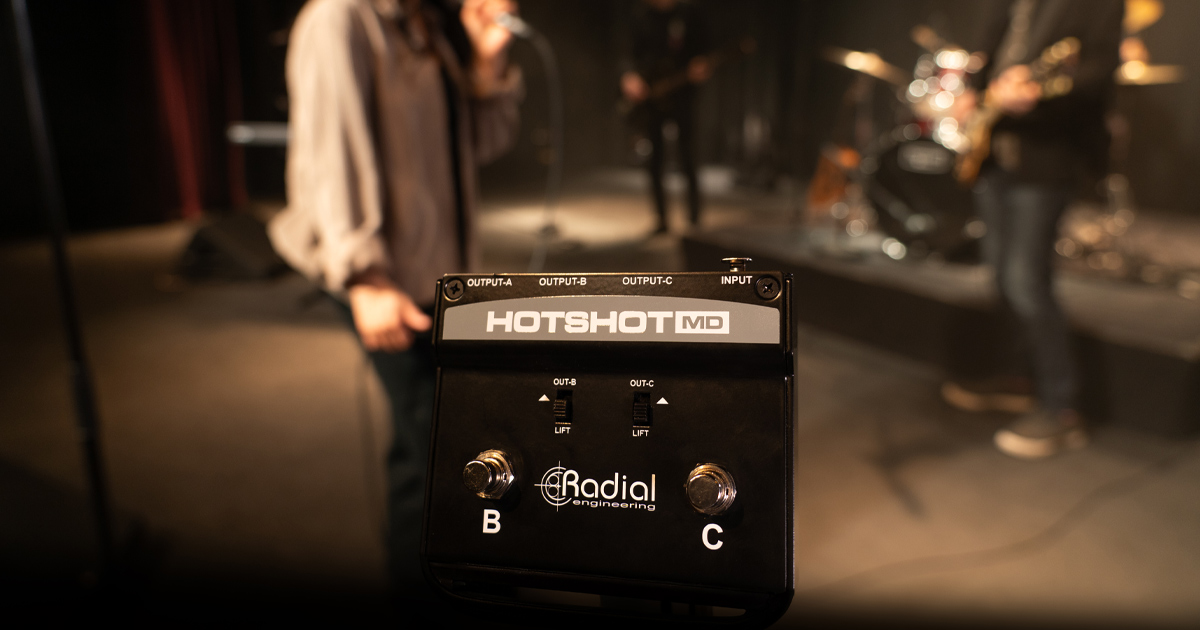
  • OUTPUT A: XLR output for the vocal channel to PA/monitor. • OUTPUT B: XLR output for connection to a second station.
  •     
  • OUTPUT C: XLR output for connection to a third station.
  •     
  • INPUT: Lockable XLR input for connection to a dynamic microphone.
  •     
  • OUTPUT B GROUND LIFT: The switch - disconnects pin 1 on output B.
  •     
  • OUTPUT C GROUND LIFT: The switch - disconnects pin 1 on output C.
  •     
  • OUTPUT B FOOTSWITCH: The momentary footswitch redirects the microphone signal to output B, automatically muting output A.
  •     
  • OUTPUT C FOOTSWITCH: The momentary footswitch redirects the microphone signal to output C, automatically muting output A.
  •     
  • MOMENTARY FOOTSWITCHES B/C (if pressed together) route the signal to outputs B and C simultaneously, automatically muting output A.
  •     
  • Passive electronics require no power
  •     
  • ROBUST 14-gauge STEEL cabinet 
  •     
  • Dimensions: 11.7 x 9.5 x 5 cm
  •     
  • Weight :  6.3 kg

HotShot MD is used to communicate with the band or technicians, without the audience noticing anything. The pedals can also be pressed simultaneously to speak to all participants at once. As soon as one of the two pedals is released, the microphone is automatically redirected to the PA system, allowing the performance to continue.

HotShot MD Applications

Using HotShot MD for silent stage communications

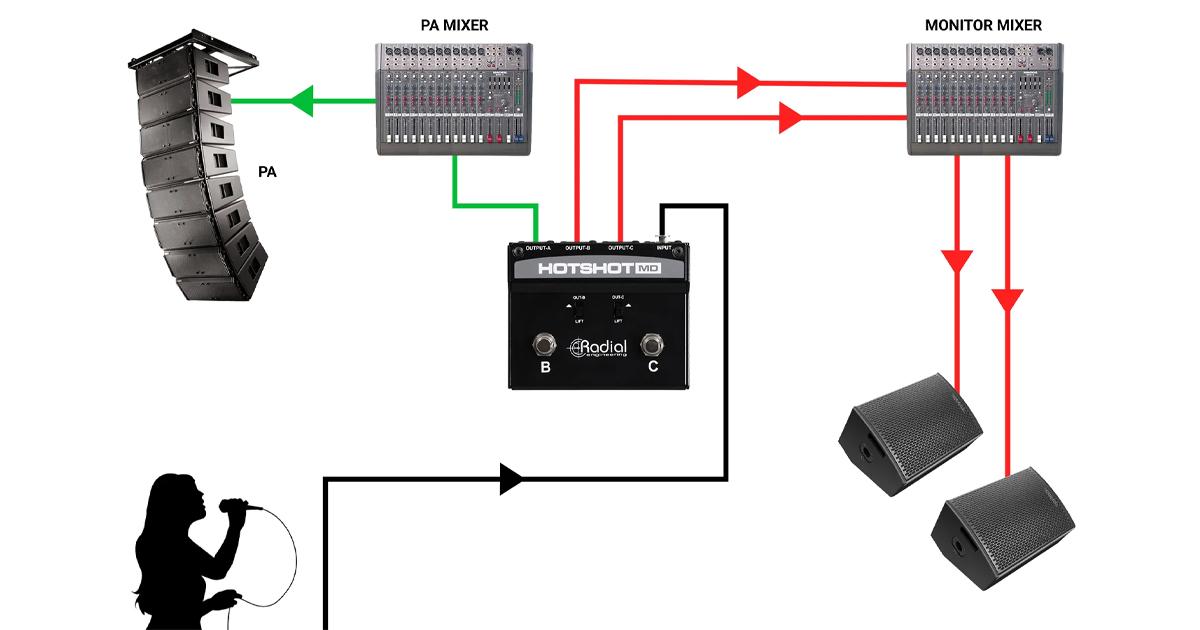
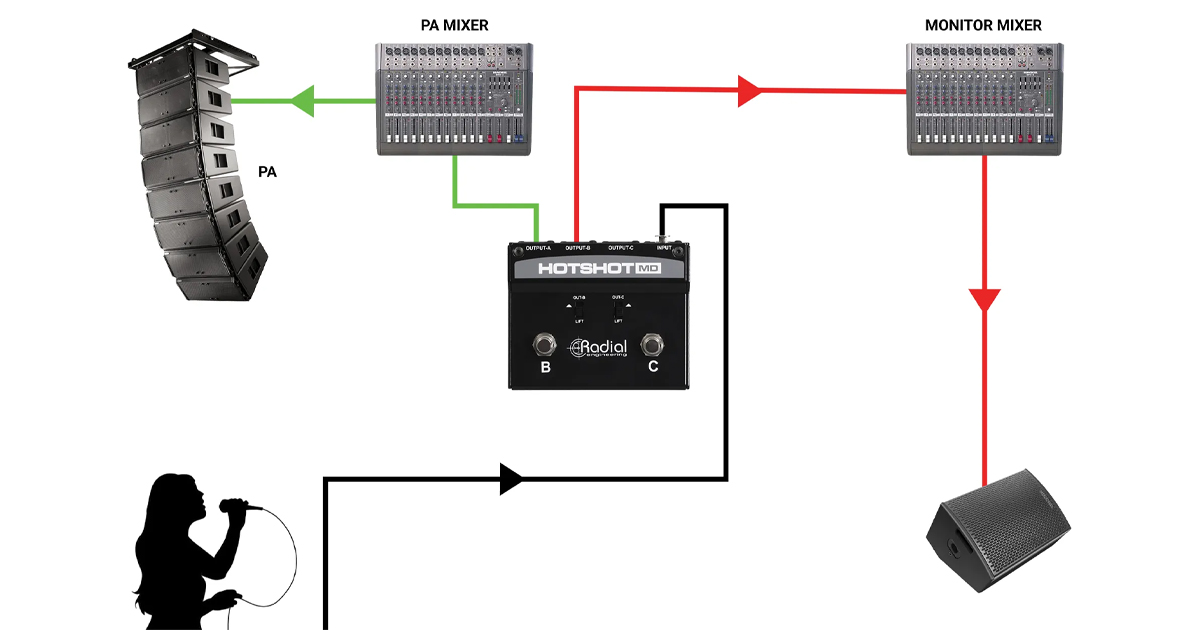
Connect the microphone to HotShot MD and connect output A to the PA system. Connect outputs B and C to separate channels on the monitor console. By pressing footswitches B, C, or both simultaneously, the PA system output is muted and the signal is sent to the band, technical team, or both.

Connect the microphone to HotShot MD and connect output A to the PA system. Connect outputs B and C to separate channels on the monitor console. By pressing footswitches B, C, or both simultaneously, the PA system output is muted and the signal is sent to the band, technical team, or both.

Using the MD as a cough silencer

No more coughing on stage. Connect the microphone to the HotShot MD input, output A to the sound system, output B to the monitor console for band communication, and leave output C disconnected. When you feel the need to cough or silence the system, simply press and hold footswitch C. Release it to return to normal operation.

No more coughing on stage. Connect the microphone to the HotShot MD input, output A to the sound system, output B to the monitor console for band communication, and leave output C disconnected. When you feel the need to cough or silence the system, simply press and hold footswitch C. Release it to return to normal operation.

Using multiple MDs for greater flexibility in additional communications

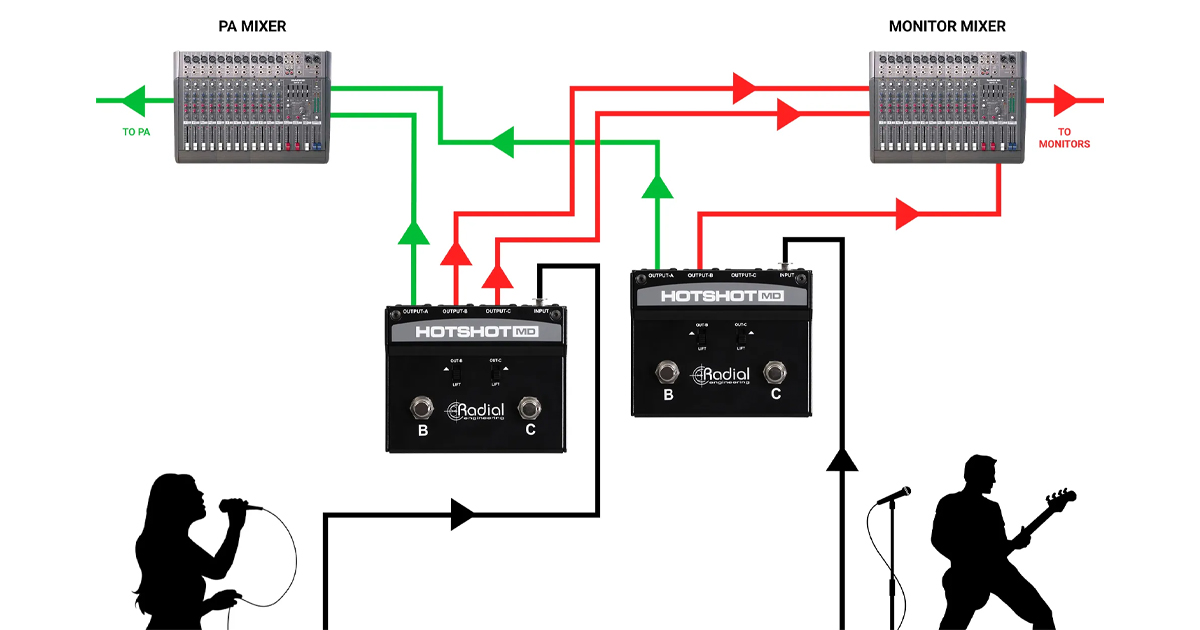
Need to add technicians and other operators to the conversation? For two-way communication with multiple people in a production situation, using additional HotShot MDs increases the ability of musicians, technicians, and engineers to communicate clearly, respond to cues, and resolve issues more effectively.

Need to add technicians and other operators to the conversation? For two-way communication with multiple people in a production situation, using additional HotShot MDs increases the ability of musicians, technicians, and engineers to communicate clearly, respond to cues, and resolve issues more effectively.

Using MD to add effects to the microphone

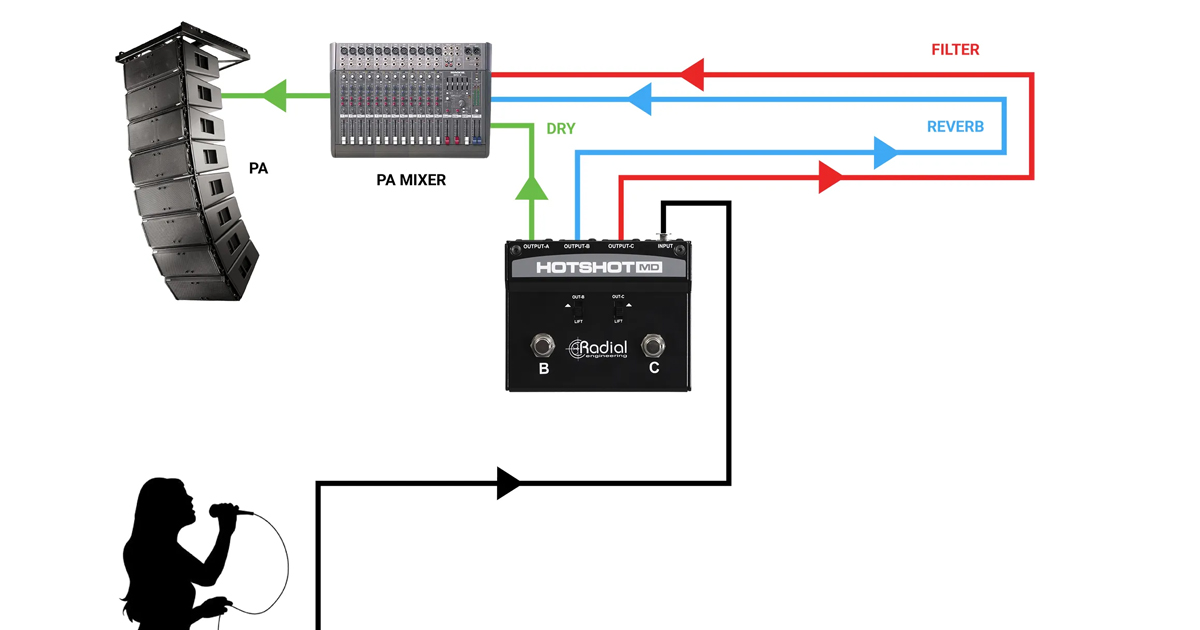
HotShot MD allows you to add effects to your voice, enabling you to apply two separate effects channels and combine them as desired. Channels B and C can be set to activate effects such as echo and delay, respectively. Simply press and hold the corresponding footswitch to activate one effect or both footswitches to use them simultaneously. Just release the footswitch to return to normal mode.

HotShot MD allows you to add effects to your voice, enabling you to apply two separate effects channels and combine them as desired. Channels B and C can be set to activate effects such as echo and delay, respectively. Simply press and hold the corresponding footswitch to activate one effect or both footswitches to use them simultaneously. Just release the footswitch to return to normal mode.

Similar products